Showing posts with label photoshop. Show all posts

Saturday, November 26, 2011

Website

I've been learning html and basic CSS as of late! I've been pretty busy figuring out how to fix the little errors I've been making and I've come a long way, so here's a little preview.


I think I'm going to change up my blog or update it, mainly because my current one is out of date and it's getting a tad wonky on me. I can't even have a regular compose/html post box...so yes, that is a sign for me to revamp! It will work out well since I'm already working on a new layout for my website. I'll go into 2012 with a bang!

I quite like the texture I used for my website because it's actually white tissue paper. I found a nice flat piece in the house and used my scanner to scan it. I adjusted the colour and added some effects on it and the result is wonderful.

The thumbnails for my works have a nice border around it. It's the same texture used for the background. The main white section is slightly faded and I used my grunge brushes to remove some sections from the sides. It has a nicer effect. At least to me it seems more interesting than plain shapes.

Most of the icons are set up now in css and html. I have some of the copy done for the about section and I believe I will be keeping what I originally had in my contact section from my previous layout.

Currently being designed in: Adobe Photoshop CS3
Additional pieces designed in: Adobe Illustrator CS3
Currently being built in: Adobe Dream Weaver CS3

Playing with InDesign


I picked up the Tales of Xillia Famitsu DX Pack early September and took some pictures for a post at my Poke the Merch blog. I took a photo of the Tipo plush and made a small page out of it. I really just wanted to get used to playing with text over images.

Edited in: Adobe Photoshop CS3
Developed in: Adobe InDesign CS3

Wednesday, October 5, 2011

Banner for Poke the Merch

Here's the main banner I made for the blog my friend and I are both running.


The photographs were taken by the both of us. The design was done by me.

After taking a photograph of my hand (more than once because it was a difficult task to do on my own), I vectored it and used it for our logo, which you can see at the top right.

Developed in Adobe Photoshop CS3

Just felt like playing around

I just felt like playing with blue (and trying out some fonts I rarely use).


I buried a bit of the text in the water and the added splash bits on top. It was fun!

Developed in Adobe Illustrator CS3

Edited in Adobe Photoshop CS3

Tuesday, August 30, 2011

One more drink for the summer?

I vectored a tropical drink this time! I know I don't like summer as much as others, but I do like cool fruity drinks (preferably non-alcoholic). Anyway, here's one for the summer!

Out of all the drinks I found on Google, I really liked this one the most because it was very colourful. I'm really happy with the gradient used for the liquid because it has that "passionate taste" look to it. I'm really pleased with the fruit hanging from the rim as well. The gradient effect worked wonderfully with the pear and cherry.

If you look closely there's a hint of ice inside the drink. Just two little blocks. Most of the light sections on the glass are ever so slightly blurred. Finally, I lowered the opacity on the white shapes. I'm very happy with this result!


Developed in: Adobe Illustrator CS3
Edited in: Adobe Photoshop CS3

Monday, August 22, 2011

Care for a glass?

Here's a little vector piece I did of a glass of wine and a bottle. I'm quite pleased with how the wine glass came out.


It's surprisingly difficult to do a semi-transparent object. I had more difficulty with the bottle than I did with the wineglass, but I managed to make both objects look decent. By dropping the opacity and adding a slight blur onto some of the darker and lighter shapes, I get a nice smooth look. If the vector objects/shapes are too sharp, the wineglass and bottle look very cartoon-y. The blur is supposed to help with the lighting and the shade.


Developed in: Adobe Illustrator CS3
Edited in: Adobe Photoshop CS3

Thursday, March 25, 2010

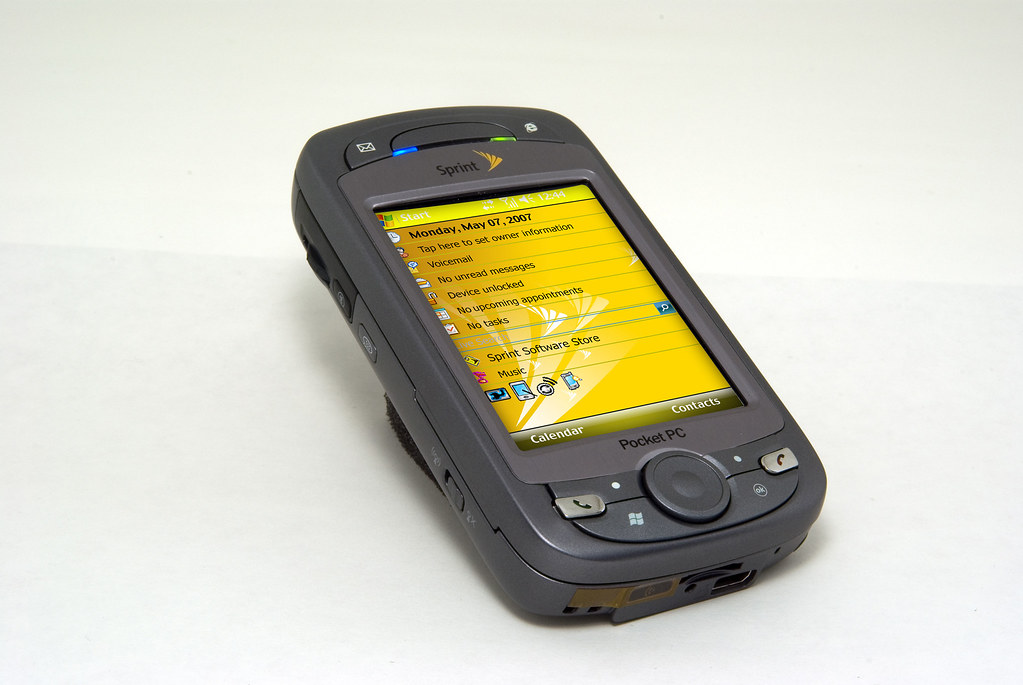
Sprint Phones

Sprint phones for Graphics and Imaging in semester 2. It was the second attempt after the school computer crashed and destroyed all of my work.

View full size of the first phone here


View full size here

These photos were not taken by me. They were used for an assignment at Seneca College.